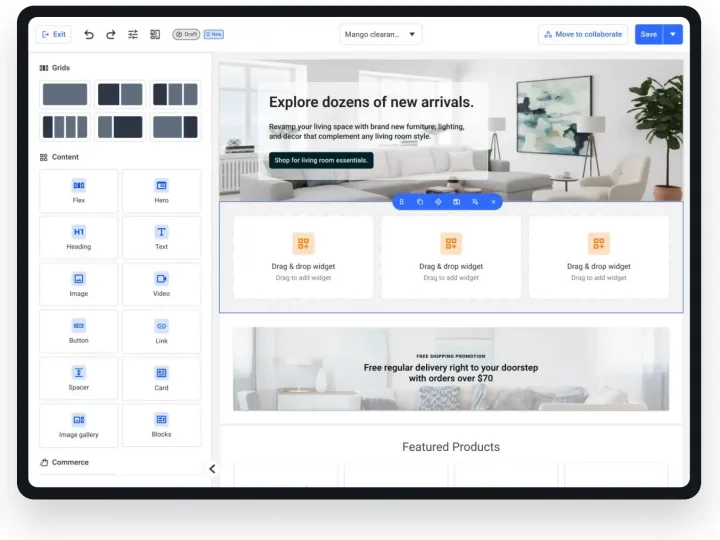
Case study · AI-native design practice
Designing With AI — Not By AI
How I turned AI agents into a force multiplier for a design team of one
- Agents
- Figma MCP
- Design systems
- Governance
- Role
- Lead UX Designer
- Practice
- AI-native design
- Products
- Enterprise commerce
- Figma files orchestrated by one agent
- 4Figma files orchestrated by one agent
- for ~3 weeks of UX discovery
- 4 hrsfor ~3 weeks of UX discovery
- component sets audited for AI-readiness
- 134component sets audited for AI-readiness
- AI tools in one design pipeline
- 5AI tools in one design pipeline
- cross-file visuals exported & scrubbed
- 17cross-file visuals exported & scrubbed
- detached components
- 0detached components
The real bottleneck
It wasn’t ideas. It was hands.
As the only designer behind a design system and several products, I had more to audit, document and showcase than hours to do it. AI didn’t replace my design judgement — it removed the mechanical work between a decision and a deliverable, so I could spend my time on the decisions.
End-to-end
My AI Design Pipeline
Each tool does the job it’s best at — and every hand-off has a human checkpoint. Research to shipped design, without losing the design system along the way.
01
Research
- ChatGPT
- Gemini
- Claude
Market scans, competitor teardowns, synthesising notes and framing problem statements — cross-checked across models and against primary sources.
OutputInsights & problem statements
then02
Explore
- Claude Design
Rapid HTML prototypes to explore layouts, flows and interactions in minutes — clickable concepts to react to before committing in Figma.
OutputInteractive HTML concepts
then03
Build
- Claude Cowork
- Figma MCP
- Desktop Bridge
The agent rebuilds the chosen concept in Figma with our real design system — library components, variable-bound tokens, text styles.
OutputOn-system Figma screens
then04
Refine
- Figma AI agent
In-canvas refinements where the team works — layout polish, variations, copy tweaks and content fills.
OutputReview-ready designs
then05
Verify
- Me
- Skills
Design crit, screenshot QA, accessibility and AI-readiness checks, brand and PII scrub.
OutputShippable, trustworthy work
Human checkpoint at every hand-off: I choose which insights matter, which concept moves forward, what “on-system” means and when it’s ready to share.
Tooling
My AI Design Stack
Not a chatbot on the side — an agent wired into the same files, libraries and tokens my team uses every day.
Research assistants
ChatGPT · Gemini · Claude
Parallel research and synthesis. Different models catch different things — I compare them and verify against sources.Claude Design
Concept prototyping
Turns a brief into interactive HTML concepts fast, so stakeholders react to something real early.Claude Cowork
Agent workspace
A desktop agent that reads files, runs code and uses tools — briefed like a collaborator, not prompted like a search box.Figma MCP + Desktop Bridge
Agent ↔ Figma
Lets the agent search our library and build in Figma — across several open files at once.Figma AI agent
In-canvas refinement
Fast iteration inside Figma for polish, variations and content once the structure is right.Skills & guardrails
Repeatable quality
Reusable instructions for audits, accessibility reviews, design-to-Figma builds and on-brand outputs.
How I work with AI
Five Rules I Don’t Break
The difference between AI that impresses in a demo and AI you can ship with is the rules around it.
AI drafts. I direct.
I own the brief, the critique and the final call. The agent owns the mechanical work in between.
Ground it in the real system
Real component instances, variable-bound tokens and text styles — never freehand shapes that only look right.
Evidence over assertion
Every number traces back to a file. Every build is checked with a screenshot. Gaps get flagged, never invented.
Protect what’s confidential
Brand names, NDA content and personal data are scrubbed before anything leaves the file.
Make it repeatable
When a workflow works twice, it becomes a skill or a checklist the whole team can reuse.
The loop
From Brief to Shipped Artefact
Every AI-assisted project runs through the same five-step loop — with me at the critique and verification gates.
1Step 1
Brief
Research with ChatGPT, Gemini and Claude, plus reference work, goals and constraints — e.g. a past case study for look-and-feel.
2Step 2
Ground
Connect the files. Inventory pages, components, variables and styles before anything is created.
3Step 3
Generate
Build with library instances, variable bindings and auto-layout — section by section.
4Human gate
Critique
I review it like a design crit: hierarchy, storytelling, credibility — and redirect.
5Step 5
Verify & ship
Screenshot QA, fact-check against sources, brand and PII scrub, open questions flagged.
In practice
Four Ways I Use AI in Real Work
00 · Concept to system
From an HTML concept to on-system Figma
I explore ideas as interactive HTML in Claude Design, then have Cowork rebuild the chosen concept in Figma — swapping every hand-made element for the real component from our library.
- Concepts in minutes, not days — stakeholders react to something clickable
- Rebuilt with library components, tokens and text styles — not freehand shapes
- Figma’s AI agent for the final polish, in the file the team already uses
- Result: speed of prototyping, consistency of the system
concept.html · Claude Design
<section class="hero">
  <h1>Spring sale</h1>
  <input placeholder="Search" />
  <button class="primary">
    Publish
  </button>
  <button class="ghost">
    Preview
  </button>
</section>Cowork +
design system
Figma · on-system
Spring sale
Label
Input text
Assistive text
PublishPreview
- Claude Design
- Cowork
- Mango DS
- Figma AI
01 · Design systems
Auditing a design system for AI-readiness
I had an agent measure how ready our library is for other agents to build from — 134 component sets and 451 variables, scored across 8 pillars.
- Overall: 64% — “partially AI-ready”
- Only 1.5% of component sets carried a description
- 83% of fills bound to tokens · ~67% Code Connect coverage
- Output: a prioritised roadmap — descriptions, Code Connect, token tiers, dark mode
AI-Readiness Audit
Design system · 134 component sets · 451 variables
64%Partially AI-ready
- Tokens & variables3/5
- Component architecture3/5
- Token binding3.5/5
- Layout & naming3.5/5
- Documentation2.5/5
- Patterns & templates3.5/5
- Code Connect3.5/5
- Governance3/5
- 1.5% sets with descriptions
- 83% fills bound to tokens
- ~67% Code Connect
02 · Documentation
A case study built from the live library
Instead of screenshots, the agent assembled a design-system case study from real component instances — so the documentation is the system.
- Real Button instances across variants and states
- Swatches bound to live colour variables
- A live Desktop vs Mobile demo driven by variable modes
- Component anatomy annotated with real token bindings
01
Auto-layout everywhere
Buttons hug their label; fields and cards fill their container. Copy can grow or translate without breaking spacing.
02
Token-bound spacing
Padding, gap, height, radius and fill are bound to variables — never typed by hand. Padding Y even adapts per breakpoint.
03
One properties panel
Variant, boolean, instance-swap and text properties turn 144 variants into one component designers configure, not detach.
03 · Research synthesis
From research boards to a lead-level narrative
The agent read problem statements, a competitor audit and a design plan in one file and mockups in another, then I shaped them into a story.
- Three Figma files connected in one session
- 17 visuals exported across files — no manual screenshots
- Brand names and a real email address scrubbed from exports
- I rewrote the arc from “what I did” to “how I led”
04 · Designing for AI
Designing the products that run on agents
Using agents every day shapes how I design agentic products — like a workbench where teams connect MCP servers and decide which tools an agent may call.
- Trust: explicit approvals and scopes per tool
- Control: modules and servers can be enabled, scoped or disconnected
- Observability: what an agent did, and why
- Built on the same design system foundations
Concept · How an agent reaches a tool
Agent
requests
MCP server
auth
Module
schema
Tools
approved
| Tool | Scope | Approval | On |
|---|---|---|---|
| search_products | Read | Auto-run | |
| update_price | Write | Needs approval | |
| delete_catalog | Admin | Blocked |
Trust
approvals per tool
Control
scope · enable · disconnect
Observability
what ran, and why
Deep dive · Requirement to design
From an Aha! Epic to a Clickable Prototype — and a Team Skill
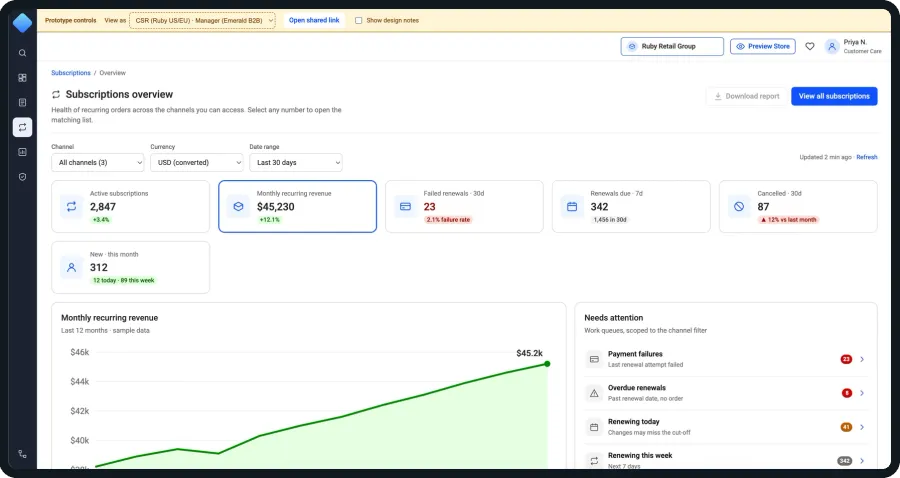
A new epic landed: subscription admin tooling — 10 linked features with strict cross-channel permission rules. Pairing with an AI agent, I compressed about three weeks of discovery — reading the spec, UX research, competitor analysis and a clickable prototype — into four hours, then turned the whole workflow into a skill my team can reuse.
3 weekstypical discovery, done manually4 hourswith an AI agent, same scope
Spec reading, 14 research methods, competitor analysis, moodboard, user flows and a clickable prototype — roughly 30× faster, with 36 PM questions and 6 blockers surfaced along the way.
- features read straight from Aha!
- 10features read straight from Aha!
- research methods applied
- 14research methods applied
- user flows mapped
- 6user flows mapped
- competitors reviewed
- 7competitors reviewed
- questions raised for the PM
- 36questions raised for the PM
- blockers caught before wireframes
- 6blockers caught before wireframes
The journey
Six Steps, One Thread of Evidence
Every artefact links back to the requirement it came from — so stakeholders can trace a design decision to a line in the spec, or to an open question.
01Read the requirement
- Aha! connector
The agent read the epic and all 10 features directly from Aha! — and flagged a feature listed in the epic but never linked.
OutputEpic summary + gap
02UX research, accelerated
- Claude
- ChatGPT
- Gemini
Objectives, problem statement + “How might we”, stakeholder map, proto-personas, scenarios, requirements breakdown, action anatomy, prioritisation, IA map, state model, task flow and 6 user flows.
OutputDiscovery workbook
03Competitors & moodboard
- Web research
- Public docs
7 platforms reviewed from public docs: positioning map, 12 × 6 capability heatmap, “same job, different paths”, pattern sketches — plus a moodboard and an 18-item capture list.
OutputVisual board
04Clickable web prototype
- Claude Design
- Design system
Dashboard, list, detail and 5 action modals built with our design tokens and layouts from existing product mockups — with a role switcher and design notes linked to open questions.
OutputPrototype for walkthroughs
05Feedback, then Figma
- Stakeholders
- Cowork + Bridge
Stakeholders review the same link as it evolves. Only after approval is it rebuilt in Figma with real library components.
OutputApproved, on-system designs
06Packaged as a skill
- Skill
- Templates
The whole workflow became a shareable skill with 7 checkpoints, a Design Plan board template and a design-ready Aha! template for PMs.
OutputReusable team workflow
Caught before a single wireframe
6 blockers that would have surfaced in QA — or in production
Research didn’t just go faster; it went deeper. Reading every feature side by side exposed contradictions no single feature revealed.
- Conflicting permissionsOne feature said only admins can cancel; two others said agents could too.
- Double-charge riskForce renewal both “skips payment” and “charges the customer”.
- Edits mid-renewalNo rule for changes made while a renewal is processing.
- Cancel timingImmediate or end of term was never specified.
- Undefined statesOnly Active and Cancelled existed, yet the dashboard showed “failed” and “overdue”.
- Where it livesUnclear which admin area the tooling belonged to.
Why it works
Faster — and Better, Not Just Faster
Speed was the headline. What made it worth adopting were the qualities a lead cares about: rigour, traceability, fidelity and scale.
Speed
About three weeks of discovery done in four hours — so design starts with a shared, evidence-based understanding instead of a guess.
Depth
Every feature read side by side: 36 PM questions and 6 blockers surfaced before wireframes, each with an ID and a severity.
Traceability
Every statement is tagged “from spec” or “assumption”; design notes in the prototype point back to question IDs.
Honest evidence
Competitor findings come from public docs only — “not found in public docs” is never written as “they don’t have it”.
Clickable early
Stakeholders react to a working prototype with role switching and no-access states — not a document.
On-system
Built with our design tokens and existing product layouts; the Figma rebuild uses real library components only.
Responsible
Fictional names and example.com emails, private-by-default pages, and the design-system file is never written to.
Scales to the team
A shareable skill, a Design Plan board and a design-ready Aha! template with a 10-point PM checklist — better inputs, better outputs.
Skillaha-to-ux-design — the workflow, packaged for every designer
- 1Requirement source
- 2Research plan
- 3Output format
- 4Design references
- 5Prototype scope
- 6Feedback loop
- 7Figma translation
Credibility
Where AI Goes Wrong — and How I Steer It
The most useful thing I’ve learnt isn’t a prompt. It’s knowing exactly where an agent will cut corners, and building checks for it.
| What went wrong | How I steer it now |
|---|---|
| It claimed to have read a reference file it never actually opened. | I ask for evidence — rendered pages, extracted text — before any design decision. |
| It drew generic cards instead of using our real components. | “Use the real library” is now the first line of every brief. |
| Layouts looked finished in code but broke on canvas — clipped text, collapsed frames. | A screenshot check after every section, not just at the end. |
| It filled gaps with plausible but unverified claims. | Every number must trace to a file; unknowns are flagged, never invented. |
| Brand names and personal data slipped into exported screens. | A mandatory brand-and-PII scrub before anything is shared. |
Leadership
Scaling It Beyond Me
Being responsible for my team’s skill development, the goal isn’t that I’m fast with AI — it’s that the whole team is.
- 01
Skills, not prompts
Workflows that work get packaged as reusable skills — audits, accessibility checks, design-to-Figma builds.
- 02
A shared brief format
Reference + constraints + acceptance checks — the structure that turns a vague ask into a reliable result.
- 03
A review checklist
Real components? Tokens bound? Facts sourced? Brand and PII scrubbed? Screenshot checked?
- 04
An AI-ready system
Descriptions, Code Connect and clean tokens mean every designer’s agent builds on-brand by default.
AI made me faster. Judgement made it good.
The leverage isn’t in generating more screens — it’s in grounding agents in a real design system, holding them to evidence, and spending the time I get back on the decisions only a designer can make. Next: closing the AI-readiness gaps in our library so every designer’s agent can build from it end to end.
Thank you