Case study · Lead UX Designer
Transforming Catalog Management
Designing a Scalable PIM System
- Understand
- Explore
- Materialize
- Role
- Lead UX Designer (solo)
- Platform
- Web app · B2B SaaS
- Client
- Enterprise commerce platform
Getting Started
Please be advised that certain aspects of the project are subject to a non-disclosure agreement (NDA). This means that while I’m enthusiastic about sharing every aspect with you, not all details can be freely shared outside of concerned team. I want to emphasize the importance of confidentiality and protecting sensitive information. Some images are intentionally sized to blur sensitive information while still conveying the necessary context.
The feature I'll elaborate on is inherent to a Commerce platform that offers a versatile solution for omni-channel commerce, catering to businesses of all sizes and industries. It empowers users with intuitive tools for centralized management of cross-channel strategies, including marketing campaigns and merchandising.
Context
A PIM system streamlines product data management, ensuring consistency and scalability across businesses. Unlike traditional catalog management, a PIM centralizes data, making it structured, accessible, and adaptable for various channels. To understand a PIM, focus on these four key components:
Product
The core entities containing all variations, attributes, and metadata.Attributes
Define product characteristics like size, color, and specifications.Sources
Centralize data from manufacturers, distributors, and suppliers.Publishing
Distribute enriched, accurate data across multiple sales channels.
Leadership
How I Led the Work
I owned the design strategy and execution end to end on a complex, multi-stakeholder project: turning ambiguous requirements into a clear plan, keeping product, engineering and customers aligned, and making the structural calls that kept the design scalable. I was the only designer, working closely with Product Managers, Technical Advisors, Customers and Architects.
Set the direction
Built a three-stage design plan (Understand, Explore, Materialize) before any screens, so every activity had a purpose and progress was visible to the whole team.Aligned the stakeholders
Mapped nine stakeholder groups, from product management and architecture to advisory services, support and documentation, and planned where each would contribute.Turned ambiguity into scope
Facilitated workshops with stakeholders to simplify and clarify product requirements.Prioritised with Product
Partnered with the Product Manager on a prioritization matrix that sequenced the first four features so that one wouldn’t block another.Grounded decisions in research
Led the evaluation of the existing tool, competitor analysis and entity mapping, so design choices traced back to evidence.De-risked delivery
Gathered internal feedback on wireframes early to validate technical edge cases, so mockups needed just one iteration.
Design Plan
Given the complexity of building a PIM system from an existing catalog tool, I started by setting the plan rather than the screens. With dependencies running from category structures and SKUs to attribute relationships, I organised the work into three stages — Understand, Explore and Materialize — and tracked the status of each method, so the team always knew where we stood and every decision balanced business needs, user requirements and technical feasibility.
Stakeholders
A PIM touches almost every team on the platform, so I mapped stakeholders early: product management, commerce and tooling architects, technical advisors, advisory services, technical support, the development team, documentation and business analysis. For each, I planned which stages and activities they would join — from user interviews and feedback workshops to brainstorming and design feedback — so the right people shaped the right decisions.
Who Are We Designing For?
In our system, personas function like a manual AI setup for personalisation, defining what each role sees on the platform. As a designer, this is critical information for structuring the design architecture. It ensures that the UI remains adaptable and doesn’t break when certain elements are hidden or restricted based on role-specific permissions.
We had about seven personas, but for the purpose of this case study, I’ll focus on the Catalog Administrator’s point of view. Primary goals of admin are:
- Responsible for all actions across the tool that other personas can do.
- Maintain the integrity of product data across all channels, ensuring that product descriptions, prices, images, and specifications are consistent across the catalog and up-to-date.
- Organize and manage the overall catalog structure, including product categories, subcategories, and product placements, to ensure easy navigation for both internal teams and customers.
- Manage catalog translations and localization, ensuring that product information is accurate and culturally appropriate for various markets and languages.
- Work closely with product managers, merchandisers, store managers, and technical support teams to ensure that catalog content is relevant, up-to-date, and accessible for everyone who needs it.
- Oversee the integration of catalog data with other systems ensuring smooth data flow and minimizing errors in product information and inventory levels.
- Provide support for catalog tool users by troubleshooting technical issues related to data import/export, catalog publishing, and system integration.
- Monitor catalog performance and ensure it is always accessible to relevant teams and systems, with no downtime, especially during peak retail periods.
- Responsible for auditing & creating/managing/reviewing different versions.
Prioritization Matrix
There were many use cases and a lot to solve, so I partnered with the Product Manager on a Prioritization Matrix to decide which features to build first and in what order, so that one feature wouldn’t block another. From it, we committed to the first four features, built step by step. This case study covers those four:
Categories
Priority 1
Categories help structure and store products in the catalogAttributes & Attribute Dictionary
Priority 2
Attributes (e.g., color, size) help generate SKUsProducts
Priority 3
Products hold SKUs and shared details like descriptionStore Keeping Units - SKU’s
Priority 4
What you buy—built from attribute combinations
Complexities in Designing a PIM for Large Enterprises
Transitioning from a legacy catalog management system to a modern Product Information Management (PIM) system presents several user experience (UX) design challenges:
Understanding Legacy Workflows
Legacy systems often have deeply ingrained workflows. UX designers must map these processes to ensure the new PIM system supports essential tasks without disrupting established operations.Balancing Familiarity and Innovation
Users accustomed to legacy interfaces may resist change. Designers need to create interfaces that feel familiar yet incorporate modern UX principles to enhance usability.Data Complexity and Quality
Product data arrives from manufacturers, distributors and suppliers in different formats, often with gaps and inconsistencies. The design has to make structure and quality visible so data can be cleaned up and trusted across channels.Integration with Existing Systems
Ensuring seamless integration between the new PIM and other enterprise systems is vital. UX design should facilitate smooth data flow and minimize user frustration during transitions between systems.Scalability and Flexibility
The new PIM should accommodate future growth and evolving business needs. Designers must create adaptable interfaces that can handle increasing data volumes and complexity.User Training and Support
Transitioning to a new system requires adequate user training. Incorporating intuitive design elements and providing accessible support materials can ease the learning curve and promote user adoption.
Market Overview
The Product Information Management (PIM) market has experienced significant growth in recent years and is projected to continue expanding:
Market Size
In 2023, the global PIM market was valued between $9.90 billion and $12.2 billion, depending on the source.Growth Projections
Estimates suggest that by 2032, the market could reach between $20.66 billion and $35.13 billion, with compound annual growth rates (CAGR) ranging from 10.1% to 21.1% during the forecast period.Adoption
The adoption of PIM solutions spans various industries, including retail, manufacturing, and e-commerce, indicating a broad and diverse user base. Despite this widespread adoption, precise metrics on the number of organizations or users implementing PIM systems are not specified
Problem & Goals
I framed the problem space as ten problem areas, each paired with a design goal. This gave product and engineering a shared reference for scope and trade-offs as the work moved into design.
Catalog Complexity & Structure
Problem: Managing data from multiple sources (distributors, dropshipping, etc.) with different formats.
Goal: Enable users to import, rearrange, and merge catalogs into a structured, unified system.
Usability & Learning Curve
Problem: Users find traditional catalog tools complex and difficult to navigate.
Goal: Build an intuitive UI with progressive disclosure to balance simplicity and advanced controls.
Access Control & Security
Problem: Lack of granular permissions leading to data inconsistencies and security risks
Goal: Implement role-based access control (RBAC) for secure catalog management
Versioning & Data Integrity
Problem: No reliable way to audit catalog changes or roll back to an earlier version.
Goal: Introduce version history & rollback mechanisms for better auditing and data recovery.
Multi-Language Support
Problem: Different regions need localized catalog content.
Goal: Enable multi-language translations with seamless import/export functionality.
Product Type Customization
Problem: Traditional PIMs struggle to handle non-purchasable items like services or digital products.
Goal: Provide customizable product types with tailored attributes.
Publishing Workflow & Approval Process
Problem: No structured way to review and approve catalog updates before publishing.
Goal: Design a multi-step workflow with draft, review, and publish stages.
Bulk Management & Smart Categorization
Problem: Users struggle with manual categorization and batch updates.
Goal: Implement AI-assisted categorization and bulk editing for efficiency.
Data Cleanup & Normalization
Problem: Inconsistent or missing product details degrade catalog quality.
Goal: Add error detection, automated fixes, and normalization tools.
Descriptive Attributes & Standardization
Problem: Similar products require different attributes across categories.
Goal: Introduce descriptive & defining attributes to ensure flexibility while maintaining consistency.
Next steps in the process
Research I Led
Once goals, users and stakeholders were clear, I led four research activities to ground the design in evidence before any wireframes were drawn:
Competitor Analysis
After the initial research where I looked into goals, problems, users, and stakeholders, I held deeper discussions to understand user scenarios. This led to a competitor analysis focused on Product and Category creation flows across various platforms. For platforms without a website, I watched YouTube videos to learn about their process.Evaluation
Following the competitor analysis, I analyzed the existing catalog management tool to understand its workflows, limitations, and impact on current users. This evaluation ensures that while designing the PIM, we address pain points without disrupting familiar processes for existing customers.Entity Mapping
To design a seamless PIM system, it's key to analyze how products, categories, and attributes interact in the current tool. Mapping these reveals dependencies, overlaps, and data flows in product management.Moodboard
I took a structured approach going beyond just translating the ERD, diving into user stories and gathering continuous stakeholder feedback, ensuring a clear design vision before creating the moodboard.
Entity Relationship Mapping of the Current Catalog Tool
To design a PIM system that seamlessly integrates with existing workflows, it is essential to analyze how different catalog elements—such as products, categories, and attributes— interact within the current tool. By mapping these relationships, we can identify dependencies, overlaps, and data flows that influence product management.
This analysis ensures that the new PIM system:
- Preserves essential connections between catalog components.
- Minimizes redundancies and optimizes data structuring.
- Supports scalability while maintaining data integrity.
- Enables a smoother transition for existing users by aligning familiar workflows with improved functionalities.
High-Level Entity Relationship Diagram
This diagram provides an overview of the core elements in the catalog tool—such as products, categories, and attributes—and how they are interconnected. It helps visualize dependencies and overlaps at a structural level.
Detailed Data Relationships & Dependencies
Expanding on the high-level view, this diagram breaks down the intricate relationships within products, categories, and attributes, highlighting dependencies, shared interactions, and areas of overlap. This deeper analysis informs the PIM system’s design by ensuring logical data flow and minimizing conflicts.
Wireframes
Before starting with wireframes, I iterated multiple times on flowcharts to resolve discrepancies and refine the structure. Walkthroughs of existing platforms provided clarity on do’s and don’ts, helping me navigate the thin line between catalog management and PIM. Ensuring this distinction remained intact was one of the key challenges in the design process.
Decisions I drove
The Calls That Shaped the Product
Behind the screens were a handful of structural decisions. These are the ones that shaped the PIM most:
Keep PIM distinct from catalog management
Walkthroughs of existing platforms and several rounds of flowcharts helped me hold the line between catalog management and PIM, one of the key challenges of the project.Reuse before reinventing
Product creation mirrors category creation, adding only what is specific to products, so users learn one pattern.Two kinds of attributes
Predefined attributes generate SKUs and power filtering; non-defined attributes add descriptive detail without limit. Both live in one attribute dictionary.Inherit by default, override when needed
SKUs inherit assets, pricing, configuration and descriptive attributes from their parent product, and can still be customised at SKU level.Reflect pricing, don’t own it
The PIM shows prices per currency and region, while the external pricing tool stays the single source of truth.Structure that scales with the business
A searchable, nested category tree and drag-and-drop hierarchy handle category structures that vary widely from one business to another.
Mockups
Thorough execution of previous steps—refining flowcharts, wireframes, and stakeholder alignment—ensured that by the time mockups were created, most challenges were already addressed. Internal feedback on wireframes helped validate technical edge cases early, making the mockup phase significantly smoother. As a result, mockups required just one iteration, a rarity in such complex projects, minimizing rework and expediting the transition to development.
I used the Design System as the foundation for mockups, ensuring consistency and efficiency. Where it fell short — the category tree, a category listing with nested drag-and-drop and a few others — I designed new components to handle multiple scenarios, complex dependencies and scale, and integrated them into the system. That streamlined this project and strengthened the Design System for future use cases.
Organizing into Folders
Catalog Management & Category Creation
Scalable Catalog Framework
Catalog Landing Page Overview
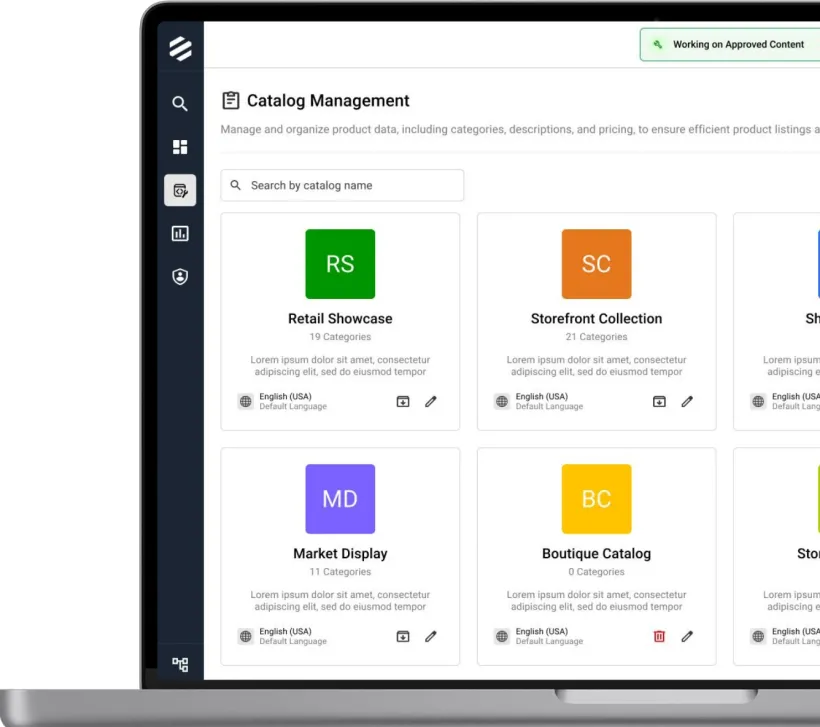
This is the entry point to the catalog module, providing a centralized view of all key catalog components—categories, products, and metadata. It’s designed for quick navigation and management, giving users a clear snapshot of the catalog structure at a glance.
Multi-Language Input
Display in Multiple Languages
With products sold across multiple geographies, the catalog needed to support scalable, multilingual inputs—allowing teams to enable specific languages based on regional and use-case requirements.
Seamless Browsing with Scalable Tree
Parent Category Selection
The number of categories can vary widely across businesses, making it challenging to design a seamless UX. To address this, a scalable tree structure that allows users to efficiently navigate, search, and drill down to view products within nested categories.
Smart Asset Management
Publishing & Managing Assets
Additional key capabilities include associating assets from an external DAM (Digital Asset Management) system to support diverse use cases like use of thumbnails/full images etc, along with flexible publishing options—allowing content to remain in draft, go live, or be pushed to an auth environment
Dynamic Category Hierarchy
Modify Sequence and Parent Relationships
Reusable Elements & Patterns
Attributes & Attribute Dictionary
Predefined vs Non-Defined Values
Standardized Attribute Management
Attributes define product variants and must be managed using industry- standard naming and formats. We considered the needs of both small and large-scale businesses to design a flexible and scalable approach to attribute management.
Predefined vs Non-Defined Values
Creating Attribute Type
If attribute values are added in creation, it become a predefined attribute type else non-defined attribute type. Each serves a distinct purpose within the product structure—predefined attributes are used for SKU generation and filtering, while non-defined ones add supplementary product information.
Read-Only View
Assets & Languages in Attributes
Similar to category creation, attributes also support asset linking and multi- language input. However, for the attribute dictionary, only image-type assets are typically expected—simplifying the standard.
Streamlined Process with Flexibile Structuring
Product Creation & SKUs Management
Reusable Elements & Patterns
Streamlining Product Creation
To maintain consistency, the structure and certain components were reused across different pages. The product creation page closely mirrored the category creation page, with a few elements specific to this page.
Managing Multiple Pricing
Price Management Overview
A product can have multiple prices based on currency and region. While the PIM reflects this pricing, it does not serve as the source of truth—pricing data is managed by an external pricing tool.
Non-defined Attributes
Adding Descriptive Attributes
Some products need additional attributes—like material or style—to better convey value to shoppers. These can be added as non-predefined attributes, with no limit on how many can be linked. All attributes are managed within attribute dictionary
Pre-defined Attributes
Managing and Adding SKU’s
SKUs are generated using predefined attributes from the attribute dictionary— such as color, size, and more—and represent the purchasable variants for shoppers. Key details like assets, pricing, configurations, and descriptive attributes are inherited from the parent product by default, but can be customized at the SKU level if needed.
Feedback, Reviews & Handoff
I kept stakeholders involved throughout, not just at sign-off, so the design stayed aligned with business needs and usability goals. Beyond the engineering and product teams, I brought wider stakeholders in early through wireframes and mockups, while they could still shape key concepts. Their feedback refined the designs for clarity, feasibility and scalability.
Every iteration was thoroughly vetted through multiple feedback loops before the designs were finalised. By the time I handed them over to development, they were well validated, reducing rework and making implementation smoother.
Outcome
What This Delivered
- Mockups signed off after a single iteration, because edge cases were resolved at the wireframe stage.
- A prioritised sequence of four core features — categories, attributes, products and SKUs — agreed with Product.
- New components, including the category tree and nested drag-and-drop listing, added to the design system for future use cases.
- Well-validated designs at handoff, reducing rework and smoothing the move into development.
Thank you