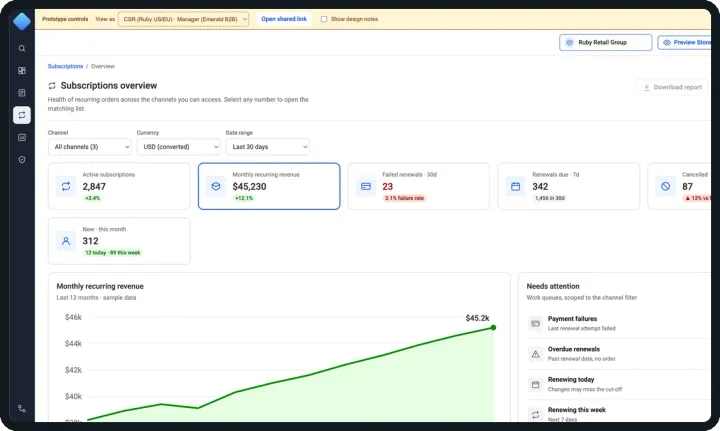
Case study · Design systems
Building Mango: a Design System for Enterprise Commerce
- Research
- Foundations
- Components
- Patterns
- Governance
- Role
- Lead UX Designer · sole designer
- Partners
- Product, architecture & engineering
- Output
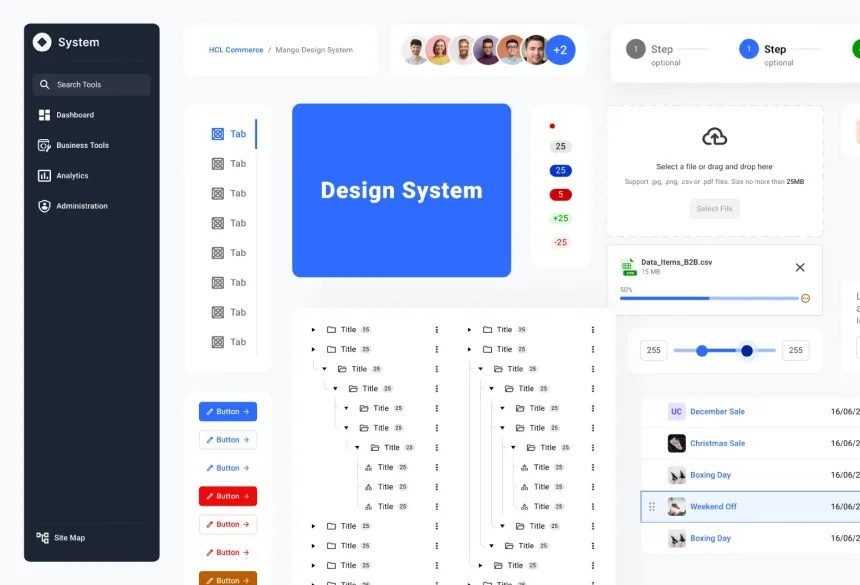
- 40 components · 150+ variations
Overview
Mango was built for an enterprise, omni-channel commerce platform used by large businesses to manage catalogs, pricing, promotions, content and stores. Its legacy tooling had grown screen by screen — inconsistent patterns, duplicated components and no shared visual language between design and engineering.
Mango is the design system I created to fix that at the root: one source of truth for foundations, components and patterns, built to be accessible by default and to scale with every new commerce module.
Why a Design System?
Before designing a single component, I aligned stakeholders on the outcomes the system had to deliver.
Speeds up development
Faster builds, reusable components and quicker releases.Visual & functional consistency
A unified look, predictable UX and shared standards across every tool.Less design & engineering rework
Fewer errors, less duplication and teams aligned on one source of truth.Scalable experiences
Flexible, extensible and future-ready for new modules and business models.
My Role
As Lead UX Designer, I was the only designer on the system — accountable for its strategy, craft and adoption.
Sole Designer & System Owner
Conceived, designed and maintained Mango single-handedly, partnering with product managers, architects and engineering leads.Research & Benchmarking
Evaluated Material UI, Carbon, Atlassian, Garden and an internal enterprise design system across seven parameters to choose the right foundation.Foundations → Components → Patterns
Built the token architecture, typography, color, 40 components and reusable product patterns in Figma.Governance & Engineering Handoff
Defined the 5-step contribution and validation process — every engineering handoff requires Design Lead approval.
What I Explored
Rather than reinvent the wheel, I benchmarked five mature design systems against seven parameters before committing to a foundation.
Material UI
Google
Carbon
IBM
Atlassian DS
Atlassian
Garden
Zendesk
Internal DS
Enterprise CoE
Compared on
- Component libraries
- Principles
- Responsiveness
- Accessibility
- Documentation
- Customization
- Drawbacks
A Material-based foundation, extended for enterprise commerce — proven component coverage and accessibility patterns, adapted to our brand, information density and data-heavy workflows.
The north star
Three Pillars Behind Every Decision
Before a single token or component existed, I defined three principles. Every decision in Mango is checked against them — and each one is tied to a measurable outcome.
Pillar 01
Consistency
Visual and behavioural consistency across every tool.
In practice
- One token set and one component API for every module
- A shared UI Shell and patterns, so tasks look and work the same everywhere
80–90%
tool consistency
Pillar 02
Accessibility
We design for everyone.
In practice
- WCAG 2.1 AA as the minimum bar — AAA where it matters
- Contrast tuned into the colour scale, not checked afterwards
AA → AAA
all audited components pass
Pillar 03
Efficiency
Teams build faster and smarter.
In practice
- Configure, don’t detach — properties, slots and variable modes
- Ready-made patterns for recurring commerce workflows
40%
faster development
A Three-Fold Framework
With the pillars set, I organised Mango into three layers that build on each other — from raw styles, to reusable components, to complete product patterns.
Style Guide
Foundational styles — typography, color, spacing, radius, elevation — expressed as tokens.
Component Library
40 reusable UI components with 150+ variations, built on the style guide.
Patterns
Repeatable UX solutions — forms, filters, modals, translation, empty states, error messages.
Foundations · Systematic & Scalable
A token architecture built to scale
Every visual decision lives in a variable — not in a component. Primitive tokens hold raw values (Mango Blue 500 = #2E6BFF); component tokens such as Button/Primary/Default/fill point to them; components consume only component tokens.
Change one primitive and every screen updates — the foundation for future theming and brand variations.
Mango Blue scale — each swatch below is bound to the live variable
Blue25
#EFF5FF
Blue50
#DAE6FF
Blue100
#BFD5FF
Blue200
#A2C1FF
Blue300
#89B0FF
Blue400
#6495FF
Blue500
#2E6BFF
Blue600
#1052FF
Blue700
#0034CD
Blue800
#002495
Blue900
#00176E
212
foundation variables
239
component-level tokens
3
modes · Desktop / iPad / Mobile
17
text styles
11
elevation styles
| Token | Desktop | iPad | Mobile |
|---|---|---|---|
| Typography/Size/H1 | 96 | 96 | 60 |
| Typography/Size/H2 | 60 | 60 | 32 |
| Typography/Size/H3 | 48 | 48 | 28 |
| Typography/Size/H4 | 34 | 34 | 24 |
| Padding/Size/s | 10 | 16 | 16 |
| Corner Radius/xxl | 48 | 32 | 32 |
One variable, three modes: type scale, padding and radius are defined once and resolve per breakpoint — Desktop, iPad or Mobile — instead of maintaining separate mobile components.
Components Built to Flex
40 published components and 150+ variations — each built with auto-layout, variable bindings and a property API designed for real product scenarios, not just the happy path.
Variant properties · Instance swap · Booleans
Button — 144 variants, one clean API
Four variant properties — Variant (Primary, Secondary, Ghost, Icon-only), State (5), Size (2) and Type (Default, Error, Alert, Success, Black) — plus boolean toggles for icons and badge, instance-swap icons and an editable label.
Designers configure instead of detaching, and every state is already token-bound and accessible.
Native slots · 3 types × 5 states × 3 sizes
Cards — any content, zero detaching
45 variants built around native Figma slots. Product teams drop in images, metadata, lists or actions while the card keeps its spacing, borders and interaction states.
The same component powers catalog tiles, dashboards and asset libraries.
Boolean configuration · Auto-layout
Data tables & filters for enterprise-scale data
The Filter Bar exposes 7 boolean properties (search, filters, selected chips, columns, actions…) and table cells expose 10 — so one component adapts from a simple list to a dense, filterable grid.
Auto-layout keeps columns, chips and actions aligned at any width.
Library at a glance
40 components · 150+ variations · ongoing enhancement
- Typography
- Color Palette
- Accordion
- Avatars
- Badges
- Breadcrumbs
- Buttons
- Split Buttons
- Chips
- Cards
- Comments
- Date Picker
- Dividers
- Empty States
- FAB
- File Upload
- Graphs
- Header
- Lists
- Menus
- Modals
- Multi Select
- Pagination
- Progress Indicator
- Selection Controls
- Scrollbar
- Side Drawer
- Sliders
- Snackbars
- Stepper
- Tabs
- Table + Filter
- Text Fields
- Toggle Switch
- Tooltips
- Translate
- Tree Structure
- UI Shell
- Banners
- Flags
How Every Component Is Built
Scale doesn’t come from the number of components — it comes from how each one is constructed. Every Mango component follows the same anatomy.
Auto-layout everywhere
Buttons hug their label; fields and cards fill their container. Copy can grow or translate without breaking spacing.
Token-bound spacing
Padding, gap, height, radius and fill are bound to variables — never typed by hand. Padding Y even adapts per breakpoint.
One properties panel
Variant, boolean, instance-swap and text properties turn 144 variants into one component designers configure, not detach.
Native slots
Open where it matters, locked where it counts
The card’s shell — padding, border, header and actions — stays locked to tokens, while the slot accepts any content. Same Cards component, different content, nothing detached.
Variable modes
One component, every breakpoint
Text styles and spacing are bound to variables with Desktop, iPad and Mobile modes. These three frames use the exact same styles — only the mode changes.
| Style | Desktop | iPad | Mobile |
|---|---|---|---|
| H1 | 96 | 96 | 60 |
| H2 | 60 | 60 | 32 |
| H3 | 48 | 48 | 28 |
| H4 | 34 | 34 | 24 |
| H5 | 24 | 24 | 20 |
Reusable Patterns
Components solve UI problems; patterns solve product problems. I documented recurring commerce workflows as ready-to-use patterns, so every module handles them the same way.
Pattern · Localization
Multi-language input
Enterprise catalogs serve many regions. The Translate pattern lets admins choose languages and edit every translatable field in a side drawer — rich text, validation and per-language collapse included — without leaving the record.
Built from Side Drawer, Accordion, Text Field and Rich Text Editor components.
Pattern · Navigation
UI Shell & navigation
One shell for every module: a collapsible primary rail, expanded menus for Business Tools and Administration, a tertiary nav for deep sections and a global top bar for workspace, store preview and user menu.
Users never relearn where things live — and new modules plug into the shell instead of inventing their own navigation.
Also documented:
- Filters & bulk actions
- File upload & scheduling
- Delete confirmation
- Snackbar messaging
- Channel association
- Onboarding guide
- Login
- Landing page & card grid
Accessibility, Verified
Every major component was checked against WCAG 2.1 AA contrast standards using Figma plugins and industry tools — covering text, icons and backgrounds.
UI Shell
15.4:1
WCAG AAA
Button
4.53:1
WCAG AA
FAB
4.53:1
WCAG AA
Success banner
13.53:1
WCAG AAA
Warning
4.64:1
WCAG AA
Chip label
9.93:1
WCAG AAA
Tree
21.1:1
WCAG AAA
Tooltip
15.41:1
WCAG AAA
Text field label
11.73:1
WCAG AAA
Menu item
21.1:1
WCAG AAA
Info banner
14.23:1
WCAG AAA
Delete action
4.59:1
WCAG AA
The Mango scale was tuned for a deliberate contrast progression: Blue 500 on white scores WCAG 4.5:1 (AA) and APCA 77 — rated best for text — so the primary brand colour is safe for buttons and links by default.
A 5-Step Contribution Process
To keep the system healthy as more teams adopted it, I set up a lightweight governance loop from request to release.
Step 1
Initiate
New need identified; set up in Figma for reuse across the design team and planned for responsive behaviour.
Step 2
Design
Reusable component, pattern or style-guide update designed and documented, ready for engineering handoff.
Step 3
Build
Engineering replicates the component, pattern or style in the coded library.
Step 4
Validate
Three rounds of validation — UX Lead, then Testing team, then Dev team.
Step 5
Evolve
New requests reviewed jointly by Engineering & Design — and the loop starts again.
What We Achieved
Outcomes reported by the product and engineering teams after adopting Mango.
40%
faster development
Shared components
60%
code reuse
Common component library
80–90%
tool consistency
Across the tool suite
50–70%
smoother handoff
Synced design & code
Accessibility
Minimum AA · AAA in selected areas
Theming / branding time
70–90% faster with centralised control
Style maintenance
50–60% less effort thanks to shared styles
Component testing time
30–40% improvement
New developer onboarding
30–50% quicker with ready UI blocks
Runtime performance
10–20% faster with optimised components
UX/UI efficiency
80–90% improvement in design time
Scalability
Easier to scale across teams & features
Design handoff
Single source of truth for design & code
Figures are team-reported estimates gathered after adoption.
Reflection
Building Mango as the only designer meant being researcher, system architect, advocate and gatekeeper at once. The biggest lesson: a design system is a product, not a file — it succeeds through governance, documentation and trust with engineering as much as through pixels.
What’s next — continued component enhancement and an AI-readiness audit of the library to support design-to-code tooling.
Thank you