Case study · Lead UX Designer
Empowering Business Users to Build Storefronts
Leading the design of Storefront Builder — a visual CMS for enterprise commerce
- Understand
- Explore
- Materialize
1
designer — end to end
6
stakeholder groups aligned
8
problem areas prioritised
4
competitors audited
9
journeys wireframed
3
delivery horizons planned
The ticket that said it all
When everyday updates become engineering work.
A simple merchandising request. In the legacy page composer it needed a developer. Multiply that by every banner, button and landing page, and business users were blocked on engineering for the most basic changes. Storefront Builder was our answer: give business users the power to build — without giving up brand consistency, catalog integrity or developer extensibility.
Some details are generalised and some visuals are intentionally scaled down under NDA.
Context
A storefront CMS is only as good as the building blocks it gives business users. Storefront Builder is organised around four capabilities:
Page Management
Create and manage content and catalog pages, their variations, SEO and scheduling.Widget Library
Drag-and-drop grids, content and commerce widgets that respond across devices.Themes & Templates
Store-wide themes plus reusable layouts, shells and blocks for every page type.Publish with Confidence
Drafts, previews, scheduled layouts and approval-ready publishing.
Why this was hard
Every Requirement Pulled in Two Directions
The objectives weren’t a feature list — they were tensions. My job as lead was to make those trade-offs explicit, and design a system that held both sides.
Freedom⟷Brand consistency
Custom HTML/CSS and full creative control — while every page still looks and feels on-brand.
Simplicity⟷Extensibility
Non-technical users productive without help — while developers can still extend widgets and code.
Content pages⟷Catalog pages
Free-form landing pages vs. PDP, PLP, kit and bundle pages driven by backend catalog data.
Ship the MVP⟷Protect the vision
Usability and publishing first — without closing the door on personalisation, access control and custom widgets.
Leadership
How I Led as a Team of One
No design team to delegate to — so leadership meant setting direction, building alignment and creating the structure that let product and engineering move with confidence.
Set the vision & strategy
Reframed a “better page composer” brief into a self-serve storefront platform for business users, with a clear north star for every release.Built the operating plan
Designed a 3-stage, 23-method research and design plan and tracked each method’s status openly with the team.Aligned six stakeholder groups
Mapped PM, architecture, technical advisory, engineering, frontend and documentation to the stages where their input mattered.Prioritised with product
Turned objectives into 8 problem statements and staged them across MVP, MMP and continuous delivery.Made the hard calls
Drove the structural decisions — content vs catalog pages, theme-first styling, reusable templates, draft-first publishing.Scaled through systems
Designed on the Mango design system I created, so one designer could deliver a product of this breadth consistently.
Design Plan
Ambiguity was the biggest risk, so I designed the process before the product: a three-stage plan of 23 methods, shared with the team and tracked method by method — making progress, gaps and next steps visible to everyone.
Stage 1
Understand
Objectives · Problem statements · Stakeholder mapping · Personas · User scenarios · Competitor analysis · Feedback workshop · Prioritisation matrix
Stage 2
Explore
Moodboard · Brainstorming · Mind mapping · Task & user flows · Lo-fi wireframes · Hi-fi mockups · Prototypes
Stage 3
Materialize
Feedback sessions · Heuristic evaluation · Internal reviews · Usability testing
Stakeholders
With no design team, alignment was my multiplier. I mapped every stakeholder to the stages where their expertise de-risked decisions — architecture on structure, engineering on feasibility, documentation once wireframes matured.
Product Manager
- Understand
- Explore
- Materialize
Involved in all stages except UI design
Commerce Architect
- Understand
- Explore
Problem statements · Personas · User flows
Technical Advisor
- Understand
User interviews · Feedback workshop
Engineering Lead
- Understand
- Explore
Problem statements · Personas · User flows
Frontend Engineer
- Explore
- Materialize
Brainstorming · User flows · Design feedback
Documentation Team
- Explore
Mature wireframe stage
Problems & Goals
I synthesised customer and stakeholder feedback into eight problem statements — each with a measurable goal — so every design decision could be traced back to a real need.
- MVP
Usability of the existing system
Problem: Hardly anything in the current page composer is easy to manage, create or understand.
Goal: An easy builder for small, medium and large businesses — non-technical users productive with little or no help, with better search and browsing.
- MMP
Widget responsiveness & customisation
Problem: Even simple UI changes need developers — e.g. a carousel with 5 images on web but 2–3 on mobile wasn’t possible.
Goal: Responsive widgets for mobile, tablet and web, and enough control over look and feel to build pages without developers.
- MVP
Widget library & extensibility
Problem: No comprehensive widget library; business users want reusable elements.
Goal: A comprehensive widget library, with a path for customers to create and publish their own widgets.
- Continuous delivery
Catalog integration & page types
Problem: Catalog-driven pages (PDP, PLP, kit, bundle) are backend-driven and limited in layout.
Goal: Pull all product data from the catalog and let users adjust how product data and attributes are displayed.
- MMP
Content personalisation
Problem: Interest in dynamic content based on behaviour and segments.
Goal: Rules-based content: show different content by audience segment, cart behaviour, cookies and more.
- Continuous delivery
Access control
Problem: No way to restrict content access by store or page.
Goal: Give people access to specific stores and pages to manage content.
- MVP
Publishing workflow & versioning
Problem: Content creators need more control over publishing and audit tracking.
Goal: Draft pages that are explicitly published to live, with versioning and auditing.
- MVP
Widget error handling
Problem: Diagnosing widget issues is guesswork.
Goal: Clear error messages with troubleshooting steps when a widget breaks or is incompatible.
Sequencing the vision
Prioritising Eight Problems into Three Horizons
Working with the Product Manager, I staged scope so the MVP fixed the most painful usability gaps first, without designing ourselves into a corner for what came next.
Horizon 1
Minimum Viable Product
Fix the fundamentals
- #1Usability of the existing system
- #3Widget library & extensibility
- #7Publishing workflow & versioning
- #8Widget error handling
Horizon 2
Minimum Marketable Product
Win on flexibility
- #2Widget responsiveness & customisation
- #5Content personalisation
Horizon 3
Continuous Delivery
Scale the platform
- #4Catalog integration & page types
- #6Access control
Competitor Analysis
To understand what business users already expect from a storefront builder, I audited the theme and customisation capabilities of four leading platforms, screen by screen.
Elementor · WooCommerce
Global colours & typography, button/image/ form styles, site identity, layout settings and per-breakpoint control (mobile, tablet, laptop, widescreen). Shopify
Colour schemes, typography, layout spacing, button/card/ badge styling, product & collection cards, search behaviour, cart type and custom CSS. Wix
Guided site setup and theme editing with visual styling for colours, text and page elements.BigCommerce
Style presets (Light, Bold, Warm), colours, typography, product & blog cards, badges, display settings and checkout styling.
Insight
Theme-level tokens are table stakes
Every platform exposes global colours and typography — so Storefront Builder needed a store-wide theme editor, not per-widget styling only.
Insight
Cards and badges are styled, not rebuilt
Product, collection and blog cards are configured through settings — informing configurable commerce widgets.
Insight
Breakpoints must be first-class
Per-device control is what lets merchants show 5 images on web and 2–3 on mobile without a developer.
Mapping the Structure
Before wireframing, I mapped the feature-level elements of Storefront Builder and the editor journey — from landing in the builder, choosing a theme, to customising home, functional and catalog pages and saving them as a theme.
Wireframes
I iterated on flows first, then wireframed every journey — page management, customising content, PLP and PDP pages, page switching, templates, assets and themes — so technical edge cases surfaced before visual design.
Decisions I drove
Five Calls That Shaped the Product
The designs that follow are the result of a handful of structural decisions. Each one resolved a tension from the brief.
One editor, two page models
Content pages are free-form; catalog pages (PDP, PLP, kit, bundle) stay bound to catalog data. Users customise how product data is shown — never the data itself.
Content ⟷ Catalog · #4
Theme-first styling
Store-wide colours, typography and buttons live in a theme editor, so brand consistency is the default and widget-level overrides are the exception.
Freedom ⟷ Consistency · #2
Templates as a reusable layer
Layouts, shells and blocks are managed in a template library with conditions on where they apply — reuse instead of rebuilding pages.
Simplicity ⟷ Extensibility · #3
Draft-first, scheduled publishing
Nothing goes live by accident: drafts, previews, scheduled layouts with priorities, and explicit publish.
Ship MVP ⟷ Protect vision · #7
Build on the design system
Every screen uses Mango components and patterns, so one designer could cover the breadth of the product — and engineering could build it faster.
Scale · #1
Mockups
Because flows, wireframes and structural decisions had already been stress-tested with stakeholders, visual design could focus on craft rather than rework. Each screen below traces back to the problem it solves.
Solves #1 Usability
Single source of truth
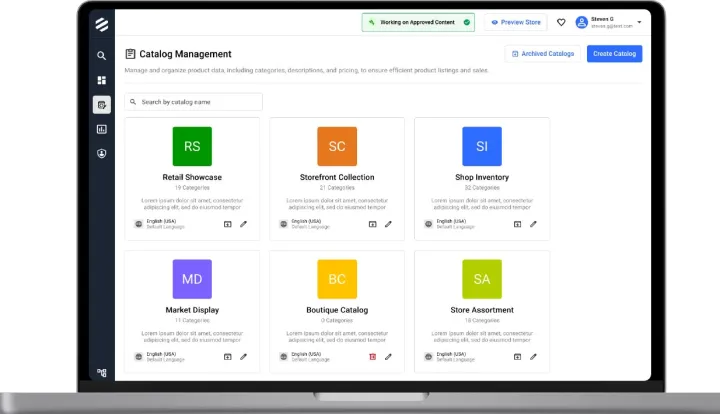
Builder Dashboard
Solves #1 Usability · #7 Publishing
Content & catalog pages
Page Management
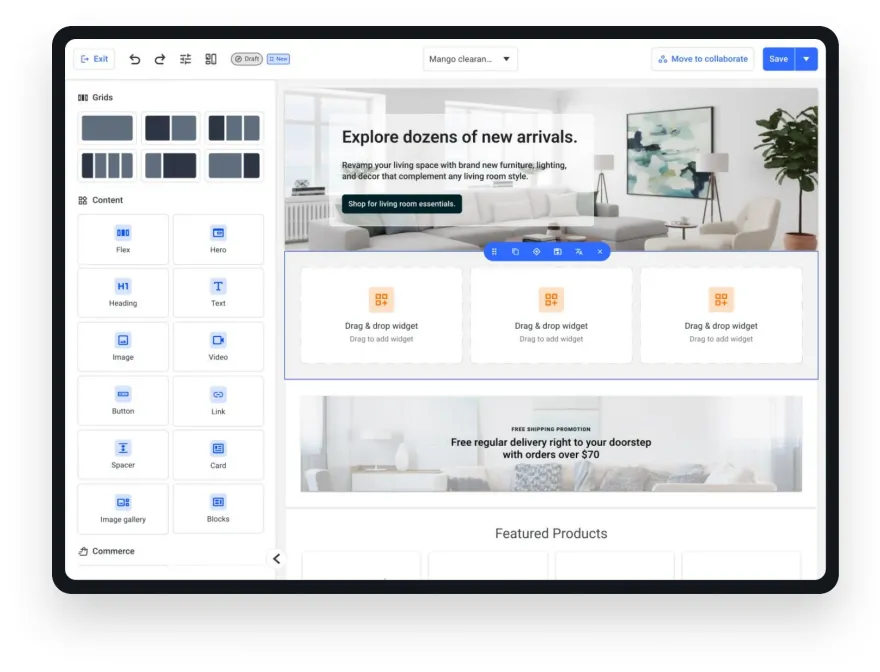
Solves #1 Usability · #3 Widget library
Drag, drop, done
The Visual Editor
Solves #2 Responsiveness · #3 Widget library
Grids & widgets
Building pages from blocks
Solves #4 Catalog page types
Data-driven, design-flexible
Customising catalog pages
Solves #2 Customisation · brand consistency
Store-wide styling
Theme Library & Theme Editor
Solves #3 Extensibility · #4 Catalog pages
Reusable building blocks
Templates: layouts, shells & blocks
Solves #7 Publishing workflow
Publish with confidence
Scheduling & SEO
Built on the Design System
Storefront Builder uses the same Mango foundations and components as the rest of the platform — which is what made a product this broad feasible for a single designer.
UI Shell & navigation
The same rail, top bar and workspace switcher as every other module.Tables, filters & cards
Page lists, template grids and libraries reuse library components.Drawers, modals & translate
Settings panels, scheduling and localisation follow existing patterns.Tokens & accessibility
Colour, type and spacing tokens keep contrast and density consistent.
What Leading This Taught Me
Leading alone, the leverage wasn’t in pushing pixels faster — it was in framing the right problems, making trade-offs explicit and building the structure (a design plan, a stakeholder map, a design system) that let everyone else move with confidence. Next: heuristic evaluation, internal reviews and usability testing with business users, alongside widget localisation and functional pages.
Thank you