Case study · Lead UX Designer
Role Management & Access Control
Empower your team with access control policies to take charge of resources!
- Role
- Lead UX Designer (solo)
- Platform
- Web app · B2B SaaS
- Client
- Enterprise commerce platform
Getting Started
Please be advised that certain aspects of the project are subject to a non-disclosure agreement (NDA). This means that while I’m enthusiastic about sharing every aspect with you, not all details can be freely shared outside of concerned team. I want to emphasize the importance of confidentiality and protecting sensitive information.
The feature I'll elaborate on is inherent to a Commerce platform that offers a versatile solution for omni-channel commerce, catering to businesses of all sizes and industries. It empowers users with intuitive tools for centralized management of cross-channel strategies, including marketing campaigns and merchandising.
Context
In our Commerce product, access control policies determine who can do what in the system. Without these policies, users can't access anything. These policies give users access to the multiple tools like Marketing, Catalog, Marketplace, Search, Promotion etc. To understand these policies, think about four main things:
Users
Users are the people who use the systemResources
Resources are objects in the system that need to be protectedActions
Actions are the activities that users can perform on the resourcesRelationships
Relationships are conditions that exist between users & resources
Challenge
At the moment, the access control setup is overly complex and lacks the flexibility to tailor to specific requirements. Administrators are unable to grant certain users access to specific tool functionalities directly; instead, they must provide access to the entire tool and then apply complex restrictions through member groups (eg. Buyer Administrators is a member group whose users play the role of Buyer Administrators) to limit certain roles.
Although customers have been expressing the need for more control over user access for a while, implementing this is not straightforward due to numerous cross-dependencies and associated complexities.
Leadership
How I Led the Work
I led the design end to end as the sole UX Designer, working closely with Product Managers, Customers and Development Architects, and owning the path from ambiguous requirements to a design validated with customers.
Framed the problem
Refined the initial requirements from Product Managers into a clear problem and scope for design.Facilitated alignment
Ran workshops with customers and stakeholders to simplify the requirements and deepen the team’s shared understanding.Drove discovery and definition
Led requirement grooming, mind mapping and task flows to turn cross-tool dependencies into concrete scenarios.Surfaced gaps early
Put the first task flows in front of stakeholders. The scenarios marked invalid exposed edge cases before any screens were designed.Set the design direction
Curated inspirations and moodboards, ran workshops to choose the right approach, then took the design from wireframes to high-fidelity prototypes.Validated with customers
Led 1:1 usability sessions with customers and turned the findings into a prioritised action list for the team.
Complexities
Our Commerce product offers a versatile omni-channel platform for businesses of all sizes and industries. With cloud-friendly technology, it centralizes cross-channel strategy management, including marketing campaigns, promotions, and merchandising. It supports both B2C and B2B transactions on a single platform, with customizable, scalable, and cloud-friendly features
Complexity 2
Dependencies
Our Commerce product primarily targets large-scale enterprises, standing out for its unique capabilities not commonly found in the market. These enterprises present complex challenges and scalability concerns, necessitating the avoidance of cross-tool dependencies to ensure maximum flexibility and appeal to a broader audience.
The same applies to access control, which relies on:
Access Group
The group of users to which the policy applies.Action Group
A group of actions performed by the user on resources.Resource Group
The resources controlled by the policy. A resource group might include business objects like contract or order, or a set of related commands. For example, all the commands that users of a particular role can perform.Relationship
Each resource can have a set of users that fulfill each relationship. For example, a policy could specify that only the creator of an order can modify it. In this case, the relationship would be creator, and it is between the user and the order resource.Member Group
A member group is a grouping of members - users, organizations, or other member groups - used for various business purposes.Roles
Our product defines a default set of roles that govern what a user is allowed to access in the system. In the access control system, policies are set up for each role.Organization
As a site administrator, your first task is to create organizations, define users, and publish a starter store to establish the site's organizational structure, crucial for managing member access.Stores
Commerce product supports several different types of entities that are defined as stores. Before making any assignments, every object within a tool must be linked to a store.
Requirement Grooming
I led requirement grooming through a series of workshops and research methods with Product Managers, Customers and Development Architects, working out on the whiteboard how personas, users and store ownership relate to each other.
Mind Mapping
With the requirements groomed and reference case studies gathered, I led a mind-mapping exercise to organise the team’s thinking and see how everything fit together. It made the connections between different parts explicit and resolved confusion in our discussions.
Task Flows
I then turned the mind map into task flows: the steps or actions required to accomplish specific tasks or goals.
Initial Task Flows
I drafted the first flows from our research and put them up for feedback. Both initial scenarios were marked invalid, and that was the point: they exposed gaps before any screens were designed.
Final Task Flows
The initial flows became the foundation for refining requirements and aligning all stakeholders. They prompted brainstorming of edge-case scenarios and filled gaps in stakeholder understanding, building on the earlier steps in the process.
I translated the easy-to-understand flows into practical scenarios that illustrated how tasks would be carried out within the features, and proposed a single linear flow where scenarios overlapped.
Inspirations
Before diving into wireframes, I curated a collection of inspirations from widely recognized tools like Microsoft Teams, Google Drive and others to analyze how they handle similar use cases. I then ran brainstorming sessions where stakeholders decided which of these solutions best met our specific needs and requirements.
Moodboards
After establishing the inspiration board, I created a moodboard tailored to use cases that are not commonly found online, divided into sections for specific features. I then ran workshops to gather highly contextual feedback on the relevance of each section, keeping the direction aligned with our objectives and requirements.
Tasks & Task Objects
User Groups & Permissions
Wireframes
With the direction agreed, I took both feature areas into wireframes.
Tasks & Task Objects
User Groups & Permissions
Decisions I drove
The Calls That Shaped the Feature
The research pointed to a few structural decisions that shaped the whole feature and answered the original challenge:
Grant access to objects, not whole tools
Administrators no longer have to grant an entire tool and then restrict it through member groups. Users and user groups can be given access to specific objects within a tool.Start from personas
Personas define roles and responsibilities at a granular level, and administrators can customise them or create new ones for their own needs.Make groups a product-wide concept
User groups work across the product for both task assignment and permissions, so nobody has to be added one by one.One linear flow where scenarios overlapped
Assigning store and user permissions to objects overlapped, so I proposed a single linear flow to remove the ambiguity.
Mockups
Before moving to mockups, I gathered internal feedback on the wireframes to get every stakeholder aligned and confirm any technical edge cases.
Persona Management
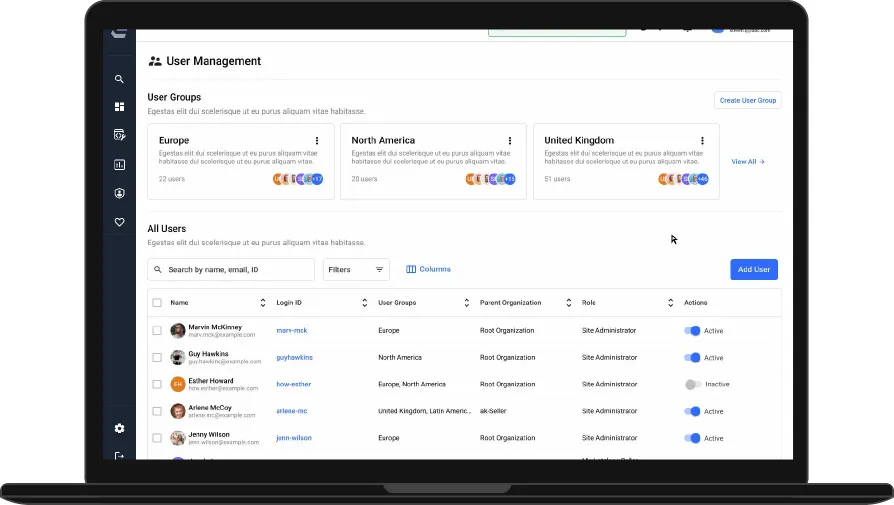
User Management
Access Control
CIF Usability Study
I led a usability study with relevant participants to gather qualitative data. It consisted of single-variant 1:1 sessions, where each participant performed a set of tasks on a prototype, followed by post-test questionnaires and SUS scoring. Across six participants, the mean SUS score was 79.6. I closed the study with an actionable list for the team: nine findings, each with a problem statement, a suggested solution and a priority.
Outcome
What This Delivered
- A role and access model built on personas, user groups and object-level permissions.
- Stakeholders aligned through workshops, task flows and internal wireframe reviews before mockups.
- A mean SUS score of 79.6 across six 1:1 usability sessions on the prototype.
- A prioritised list of nine usability findings, each with a suggested solution, to guide the next iteration.
Thank you